


If you’re in operations or IT leadership at a traditional B2B company, here’s your reality check:
66% of businesses have automated at least one process as of 2024, and that figure will reach 85% by 2029. If your organization hasn’t started, you’re already behind—watching competitors cut costs, boost efficiency, and scale effortlessly while manual workflows slow you down.
We’ve worked with many B2B companies running legacy systems built for a different era, spreadsheets, email chains, and repetitive tasks that waste skilled employees’ time.
The result:
- Manual errors that cost thousands
- Inefficient resource use
- Poor inter-department coordination
- No scalability without hiring more people
We share the new bridges of cutting-edge automation trends with the practical realities of legacy B2B systems, a modernization roadmap designed for real-world constraints.
Understanding Business Process Automation in 2025
Business process automation (BPA) replaces manual tasks with technology-driven workflows. But in 2025, it’s evolved beyond task automation into intelligent hyperautomation, a combination of RPA (robotic process automation), AI, ML, and process mining that enables self-improving systems.
The market proves its momentum: valued at $16.8 billion in 2024, it’s projected to reach $61.2 billion by 2034 (13.8% CAGR). This isn’t hype, it’s a business transformation.
Let’s clarify the taxonomy:
- BPA automates complex workflows across departments.
- RPA uses bots for rule-based, repetitive tasks.
- BPM (business process management) is the discipline of analyzing and optimizing workflows; automation is one of its tools.
- Hyperautomation integrates AI and process mining to build intelligent, adaptive systems.
From Manual Processes to Intelligent Hyperautomation
Ten years ago, automation meant bots copying data between systems. Today’s intelligent automation learns, adapts, and makes decisions.
In 2024, 68% of deployments were cloud-based, removing the need for expensive infrastructure and giving SMEs access to enterprise-grade tools.
The Power of Process Mining
Process mining analyzes real workflows, revealing hidden inefficiencies and automation opportunities. Instead of guessing what to automate, it pinpoints the biggest-impact processes.
For B2B legacy environments, you can start small with RPA automating data entry or reporting—and gradually introduce AI for smarter decisions.
BPA vs RPA vs BPM: Knowing the Difference
Understanding these distinctions helps you choose the right starting point.
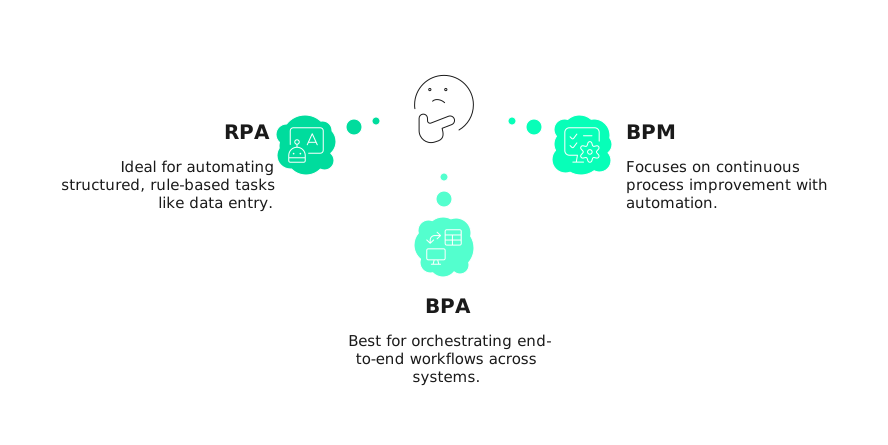
- RPA: Best for structured, rule-based tasks (e.g., data entry, invoices). It struggles with exceptions or unstructured data.
- BPA: Orchestrates end-to-end workflows across multiple systems, like order-to-cash or onboarding.
- BPM: Focuses on continuous process improvement. Automation enhances its results.
Practical tip:
Start with RPA for repetitive tasks.
Use BPA to automate multi-department workflows.
Adopt BPM when you’re ready for continuous optimization.
Suggested reading:
Reducing Human Error: Business Process Automation Benefits for Data Accuracy
Why Business Process Automation Matters for Legacy B2B Companies
With most businesses automating, manual operations are now a competitive disadvantage.
The BPA software market will nearly double from $13B in 2024 to $23.9B by 2029 showing that automation is no longer optional.
The Cost of Staying Manual
Manual processes bring three major constraints:
- No scalability without hiring
- Slow turnaround times
- High employee turnover due to tedious work
Real-world examples show the ROI clearly:
- Uber saved $10M annually by automating 100+ processes.
- National Interstate Insurance achieved a 9× efficiency gain through workflow automation.
- Financial firms cut loan processing time by 34%.
- Accounts Payable automation reduced cycle times by 80%.
How Automation Fixes B2B Pain Points
Manual Errors
Human data-entry error rates (1–5%) can be cut by 70% or more with automation.
Wasted Talent
Employees spend up to 40% of time on repetitive reconciliation, automation frees them for analysis and strategy.
Poor Coordination
Automated workflows replace email chains with real-time task routing.
Delayed Insights
Automation enables real-time dashboards instead of monthly reports.
Scalability Limits
Automated processes scale effortlessly, without proportional headcount increases.
How Business Process Automation Works
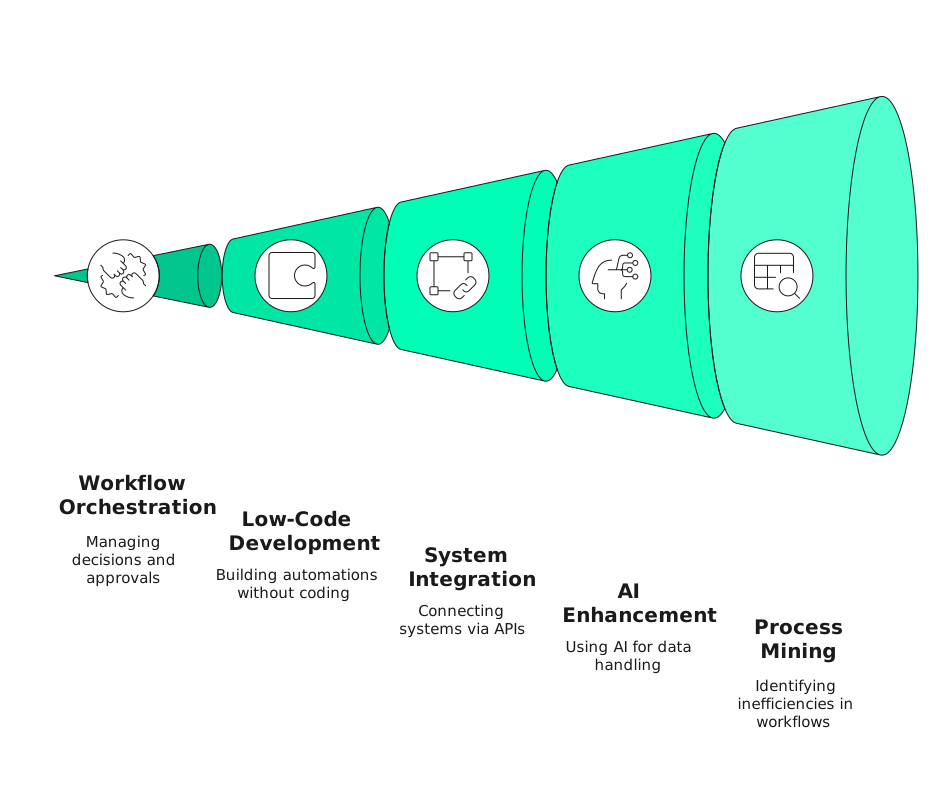
A modern BPA system includes five technology layers:
- Workflow Engines: Orchestrate decisions, handoffs, and human approvals through visual drag-and-drop interfaces.
- Low-Code Platforms: Allow analysts to build automations without programming.
- Integration Layers: Connect systems through APIs or database connectors, essential for legacy systems.
- AI Components: Use NLP, OCR, and ML to handle unstructured data and make intelligent decisions.
- Process Mining: Maps actual workflows to uncover inefficiencies.
Most modern solutions run on cloud infrastructure, no installations, lower cost, faster scaling, and automatic updates.
Are Your Legacy Systems Holding Back Automation?
You don’t need to replace your tools to automate. We connect existing infrastructure to modern automation platforms using APIs, database connectors, and proven integration methods preserving critical functions while eliminating manual work.
Integrating BPA with Legacy B2B Systems
Legacy systems weren’t built for automation, but replacing them outright is rarely feasible. The solution is hybrid automation modernizing workflows around existing systems.
Common Integration Methods
- API Integration: Preferred when available; provides structured access without modifying core systems.
- Database Connectors: Directly read/write data fast but needs IT oversight.
- File-Based Integration: Uses CSV/XML transfers for batch automation.
- Screen Scraping: A fallback method where bots mimic user actions through the UI.
Each method depends on your legacy environment. Many B2B companies succeed with a gradual modernization strategy automating around legacy systems first, then upgrading them selectively.
Implementation Framework: A Phased Approach to BPA Success
You can’t “install” automation overnight.
It’s a journey of four phases:
- Assessment & Process Selection: Identify high-volume, rule-based workflows with clear ROI.
- Pilot Testing: Start small to validate outcomes and refine automation rules.
- Change Management: Train staff, communicate wins, and manage resistance.
- Scaling & Optimization: Expand automation based on performance metrics and feedback.
Rushing through these stages is the biggest reason automation projects fail. Each phase should build confidence and capability across teams.

Suggested reading:
Why Scalable CMS Platform Matter: Choosing the Right System for Long-Term Business Growth
Departmental Automation Opportunities
Automation benefits every department, but these areas deliver the fastest ROI for B2B organizations:
Finance & Accounting
Finance departments are automation goldmines; process-heavy, rule-based, high-volume transactions.
| Transaction Processing |
|
| Month-End Close & Compliance |
|
| The Impact | Up to 80% of transactional accounting can be automated, freeing finance teams for analysis, forecasting, and strategic planning instead of data entry. |
Human Resources and Onboarding Automations
Human resources is evolving from an administrative function to a strategic partner, and automation is enabling that transformation.
| Onboarding & Recruitment |
|
| Benefits & Time Management |
|
| The Impact |
|
Marketing and Sales Operations
Marketing and sales automation isn’t just for B2C companies B2B organizations see tremendous value from automating their go-to-market processes.
| Lead Generation & Nurturing |
|
| Sales Acceleration |
|
| Pipeline Visibility |
|
IT Operations and Support
IT departments are both users and enablers of automation they automate their own operations while supporting automation initiatives across the business.
| Service Desk & User Support |
|
| Infrastructure & Security |
|
| DevOps & Incident Response |
|
Is Scattered Data Slowing Your Decisions?
Consolidate tools, metrics, and workflows into one real-time dashboard. Eliminate manual reporting, track performance instantly, and empower teams to act on insights—not hunt for them across disconnected systems.
Solving the Legacy Integration Puzzle
Modern integration platforms are built specifically for hybrid environments.
API-led connectivity connects legacy systems with modern BPA tools without full replacements. When APIs aren’t available, third-party platforms often provide prebuilt connectors.
Adopt a hybrid model keep core legacy systems for transactions, automate the workflows surrounding them (approvals, validations, reporting). This delivers automation benefits without risky migrations.
Integration architecture options:
- Point-to-Point: Quick, but hard to scale.
- Hub-and-Spoke: Centralizes logic and simplifies maintenance.
- Event-Driven: Enables real-time, loosely coupled data flow.
Decide whether to modernize, integrate, or retire legacy systems based on business value and scalability needs. Most B2B organizations need a mix of all three.
Emerging Trends Shaping the Future of Automation
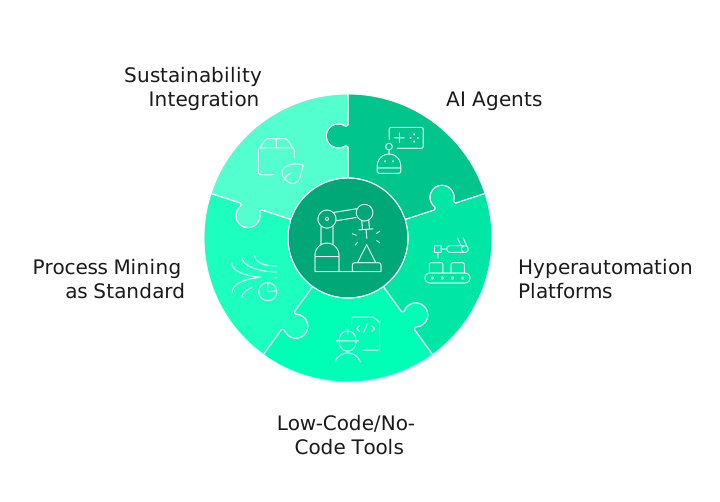
The next phase of business process automation is already here:
- AI Agents: Move beyond rule-based bots to intelligent, self-learning systems that handle exceptions autonomously.
- Hyperautomation Platforms: Unified ecosystems combining RPA, AI, process mining, and low-code tools.
- Low-Code/No-Code Tools: Empower “citizen developers” to build automations, accelerating adoption (with proper governance).
- Process Mining as Standard: Data-driven automation identification replaces guesswork.
- Sustainability Integration: Automation reduces paper, optimizes energy use, and supports ESG reporting.

Suggested reading:
How B2B Businesses Can Reduce Manual Tasks by 50% with CRM Workflow Automation
The Strategic Imperative: Why You Must Act Now
Automation has become more than efficiency; today it’s all about survival in a competitive landscape.
Here’s the strategic reality: with 85% of businesses expected to have automated at least one process by 2029, the competitive bar is rising fast. Your competitors are already achieving the kinds of results we’ve documented multi-million dollar savings, ninefold efficiency increases, faster cycle times.
The benefits are proven:
- 70%+ reduction in errors
- 80%+ time savings in high-volume processes
- Scalable operations without proportional cost increases
For legacy B2B systems, the path forward is phased modernization starting small, integrating gradually, and building momentum. Every month you delay, your competitors gain ground in cost efficiency, speed, and adaptability. Business process automation is now the foundation of digital competitiveness.
At Aweb, we’ve guided numerous B2B companies through this transformation balancing legacy constraints, cultural challenges, and ROI targets.
If you’re ready to explore what automation could look like for your organization, we’re here to help you navigate that journey confidently.
Stop losing ground to automated competitors. We help B2B legacy companies identify high-impact automation opportunities, integrate with existing systems, and deliver measurable ROI in months—not years.

Frequently Asked Questions
What is the difference between business process automation and robotic process automation?
BPA is the broader discipline of automating complex, end-to-end workflows across multiple systems and departments. RPA is a specific technology within BPA that uses software bots to automate repetitive, rule-based tasks by mimicking human actions. RPA is a tool within the BPA toolkit—useful for specific tasks, not a complete solution.
Which business processes should be automated first?
Prioritize processes that are highly repetitive, rule-based, time-consuming, error-prone, and high-impact (affecting revenue, customer experience, or compliance). Quick wins combining high business impact with ease of automation build momentum and prove ROI for complex initiatives later.
How long does it take to see ROI from business process automation?
Pilots show results within 6-12 weeks. Simple RPA pays back in 3-6 months; complex workflow automation takes 12-18 months. Start with high-impact processes where time savings and error reduction are immediately measurable.
Can small businesses afford business process automation tools?
Cloud-based platforms start at a few hundred dollars monthly, with free tiers available. ROI matters more than cost—if you’re spending $10,000/month on manual labor for a process automation handles at $500/month, company size is irrelevant.
How do you overcome employee resistance to automation?
Communicate transparently about goals and job impacts. Address job loss fears by showing how automation eliminates tedious work for higher-value activities. Involve employees in design, identify champions, provide training, and create feedback loops. When people understand benefits and feel heard, resistance drops.